


Cloud Video Surveillance for Communities and Commercial Properties
Cloud Video Surveillance Systems
Secure Space Integrations designs, installs, modernizes, and supports cloud-managed video surveillance systems for HOA communities, apartment properties, commercial buildings, parking areas, entrances, amenities, and multi-site portfolios throughout Florida.
Quick overview
Better Visibility Without Being Tied to One Recorder
Best for
HOAs, apartments, offices, parking areas, commercial properties, and multi-site portfolios
Cloud video surveillance gives authorized users secure remote access to live and recorded video while making it easier to manage cameras across one property or many locations. SSI can build new systems, migrate compatible cameras, replace aging equipment, and provide ongoing support.
SSI provides
Design, installation, camera replacement, system takeovers, cloud migration, and support
Core capabilities
Remote viewing, cloud storage, analytics, health monitoring, alerts, and multi-site management
Overview
Cloud Video Designed Around How the Property Is Managed
A commercial video surveillance system should do more than record footage. It should help property managers, security teams, and business owners quickly find important events, verify what happened, monitor camera health, and manage access to video without being physically present at the site.
SSI designs systems around the property’s real priorities, including entrances, parking areas, gates, amenity spaces, loading zones, common areas, perimeter locations, and remote buildings. Systems can be built as fully cloud-managed deployments or as hybrid solutions that reuse compatible cameras and infrastructure.
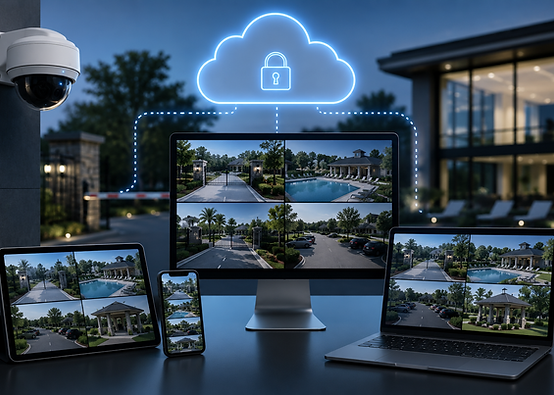
With cloud video surveillance, many service issues can be diagnosed and resolved remotely, minimizing downtime while reducing service costs for your community.
-
Secure live and recorded video from computers and mobile devices
-
Centralized management for one property or multiple locations
-
Cloud storage options based on retention and resolution needs
-
Camera health monitoring, alerts, analytics, and remote support

-
Operator and control-board troubleshooting
-
Spring, arm, loop detector, photo-eye, and safety-device repairs
-
Complete operator replacement and system modernization
Cloud Platform
Remote Access to Live and Recorded Video
Cloud video platforms allow authorized users to view cameras, search recorded footage, share clips, manage permissions, and monitor multiple properties without relying on a recorder that can only be accessed locally.
For management companies and businesses with several locations, a centralized platform can make daily use much easier. Users can move between properties, compare camera views, review events, and control who has access to specific sites or cameras.
Camera Options
The right camera depends on the scene, distance, lighting, mounting location, and the detail the property needs to capture. A general overview camera and a camera intended to identify license plates or faces serve very different purposes.
SSI selects cameras based on the actual viewing objective rather than using the same model everywhere. That helps improve image quality, storage efficiency, analytics performance, and long-term reliability.
Cameras for Entrances, Parking Areas, Buildings, and Perimeters

Video analytics can help users search footage, receive useful alerts, and focus attention on events that matter instead of manually reviewing hours of recordings.
People and Vehicle Detection
Filter events by people, vehicles, direction of travel, zones, and other supported classifications.
Search and Investigation
Use thumbnails, timelines, motion regions, and event filters to locate incidents more quickly.
Operational Alerts
Create alerts for selected areas, activity types, schedules, camera health, or other supported conditions.
Find Important Activity Faster
Video Analytics

SSI designs camera coverage around security risks, operational concerns, incident history, lighting, traffic flow, and the level of detail the property needs.
Entrances and Gates
Monitor vehicle lanes, visitor entry, barrier arms, resident access, intercom areas, and approach roads.
Parking and Common Areas
Cover parking lots, garages, pools, clubhouses, package areas, fitness centers, and shared spaces.
Buildings and Perimeters
Monitor offices, doors, loading areas, storage areas, remote buildings, fence lines, and property boundaries.
Applications
Video Coverage for the Areas That Matter Most

System Takeovers
Move an Existing Camera System to Better Management
A full camera replacement is not always necessary. SSI can evaluate existing cameras, wiring, network switches, power, mounting locations, recorders, and internet connectivity to determine what can be reused.
Assess Existing Equipment
Review camera models, image quality, network condition, cabling, power, storage, and current system limitations.
Identify Reusable Cameras
Compatible IP cameras and infrastructure may be migrated to a cloud platform when condition and performance are acceptable.
Replace Failed or Obsolete Components
Upgrade cameras, switches, recorders, bridges, storage, or network equipment that limit reliability or image quality.
Move to Centralized Management
Bring compatible cameras into a secure cloud platform with remote access, user permissions, alerts, and support.
Support and Reliability
Cloud-managed systems can provide camera health information, connectivity status, alerts, and remote troubleshooting tools that help identify problems before a technician arrives.
Camera Health Monitoring
Identify offline cameras, recording interruptions, connectivity problems, and other supported system issues.
Remote Troubleshooting
Review camera status, settings, video quality, network conditions, and platform alerts before scheduling on-site service.
Scalable Storage and Access
Adjust retention, user permissions, camera groups, and multi-site access as the property’s needs change.
Remote Visibility Can Reduce Unnecessary Service Calls
Frequently Asked Questions
Common Questions About Cloud Video Surveillance
Does cloud video require replacing every camera?
Typically no. Many existing IP cameras may be compatible with a cloud platform. SSI evaluates camera models, image quality, network condition, and current infrastructure before recommending what should be reused or replaced.
How much video storage can a cloud system provide?
Retention times are based on end user requirements. Typically 14 to 30 days is standard but the system can hold video up to 3 years. Of course, retention comes with a cost.
Can multiple properties be viewed from one account?
Yes. Cloud video platforms can allow authorized users to manage multiple communities, buildings, or business locations from one secure account.
Can cameras send alerts for people or vehicles?
Many modern systems support analytics and alerts for people, vehicles, motion zones, schedules, camera health, and other supported events.
What happens if the internet connection goes down?
The answer depends on the platform and system design. Some systems include local buffering or recording options, while others depend more heavily on the connection. SSI designs around the property’s reliability and retention requirements.
Related Resources
Cloud Video Surveillance Resources
Explore related SSI pages covering camera systems, license plate recognition, system takeovers, gate monitoring, and access control integration.